Clusters
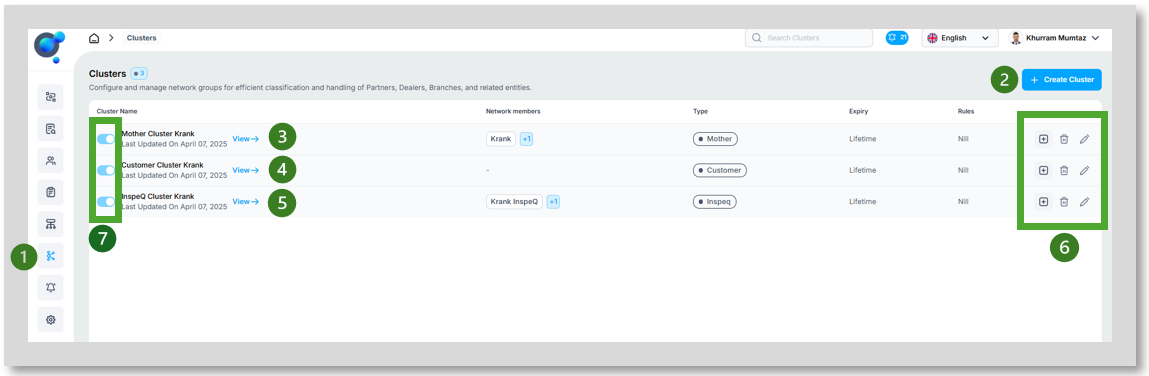
“Clusters” (1) where you can view current Clusters or create new ones (2) are foundational for managing users across Krank products. They allow for the segregation of users by type and purpose and allow individual control to each.
Types of clusters:
Mother Cluster (3): Linked with Corflex and where users for Coreflex can be set up.
Customer Cluster (4): Providing customers access to marketplace.
Inspeq Cluster (5): Set up Inspeq users.
o Add network, delete and edit cluster (6): Further manage your clusters. Adding a network to your cluster will open a new screen. Invite networks from your organization into your cluster, be aware of the cluster type (Internal/External). If internal, ensure the network is part of your organization before proceeding.
Enable/Disable Clusters (7): Switch clusters on or off when required without the need to delete.
View cluster details:
Names of clusters.
Types of clusters (mother, customer, Inspeq).
Lifespan of clusters (lifetime or specific end date).