Inventory Management
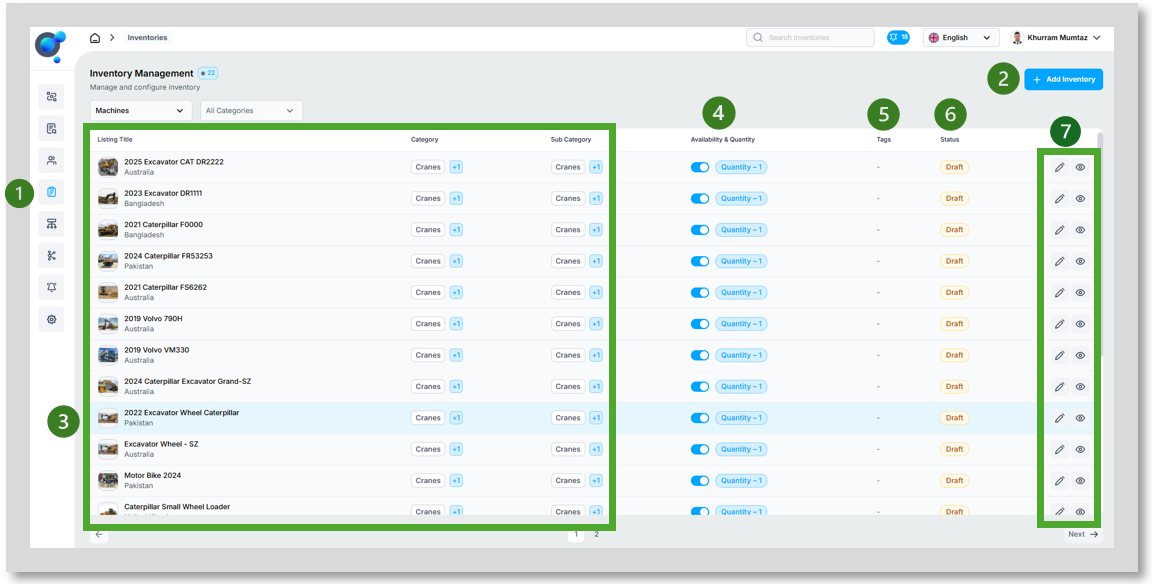
Located under “Inventory Management” (1) is the ability to manage and configure inventory. This can be done manually or potentially through integrating your existing listing database. Please speak to your Krank contact regarding this.
To Manually add inventory you can select “Add Inventory” (2), this will open the listing creation wizard.
Once inventory exists the dashboard provides an overview of Listing details (Image, title, location, Category, Sub-Category) (3) and the ability to set quantities and availability through the toggle (4). The dashboard also provides a view of “Tags” (5) set up with the listing and current “Status” (6). Finally the dashboard also allows each listing to be edited or viewed (7).
For those user with Inspeq, the inventory here will also feed through to the app and allow for Inspections to be completed for the specific equipment.