
What SEO optimization can I do?
Optimizing Your Listings for Better Visibility is straightforward with Coreflex.
Coreflex gives you the ability to take control of key SEO elements, ensuring your listings are optimized for search engines and user engagement. Below is a quick guide to the SEO components you can configure within the platform.
When creating or editing your categories and sub=categories you can include the following:
H1 Title – The Main Heading of Your Page
The H1 Title is the primary heading of a webpage, serving as a key indicator of the page’s content. It helps both users and search engines understand the topic of the page.
Why It Matters: A well-structured H1 improves readability and enhances search engine rankings.
Where to Update It in Coreflex: Go to the Inspection tab. Click on Edit Category/Sub-category. Scroll Down to the bottom of the wizard, add your H1 Title.
Meta Title – Your Page’s First Impression
The Meta Title appears in search engine results and browser tabs, playing a crucial role in attracting clicks.
Why It Matters: An optimized Meta Title improves search visibility and increases click-through rates.
Best Practices: Keep it concise, relevant, and include important keywords.
Where to Update It in Coreflex: Go to the Inspection tab. Click on Edit Category/Sub-category. Scroll Down to the bottom of the wizard, add your Meta Title.
Meta Description – A Summary That Drives Clicks
The Meta Description is a summary (typically 150-160 characters) that appears below the Meta Title in search results.
Why It Matters: A compelling Meta Description helps users understand the page’s content and encourages them to click.
Best Practices: Make it clear, engaging, and include relevant keywords.
Where to Update It in Coreflex: Go to the Inspection tab. Click on Edit Category/Sub-category. Scroll Down to the bottom of the wizard, add your Meta Description.
By optimizing these elements in Coreflex, you can enhance your website’s SEO, making it easier for potential buyers to find your listings.
What is a tag and how can I create them?
Tags include all the categories relevant to a piece of equipment. For example, if you are creating a sub-category for an excavator, it may be associated with multiple categories such as material handling, agriculture, crushing and screening, and mining & quarrying, even if its primary category is construction.
You can create a tag following this process:
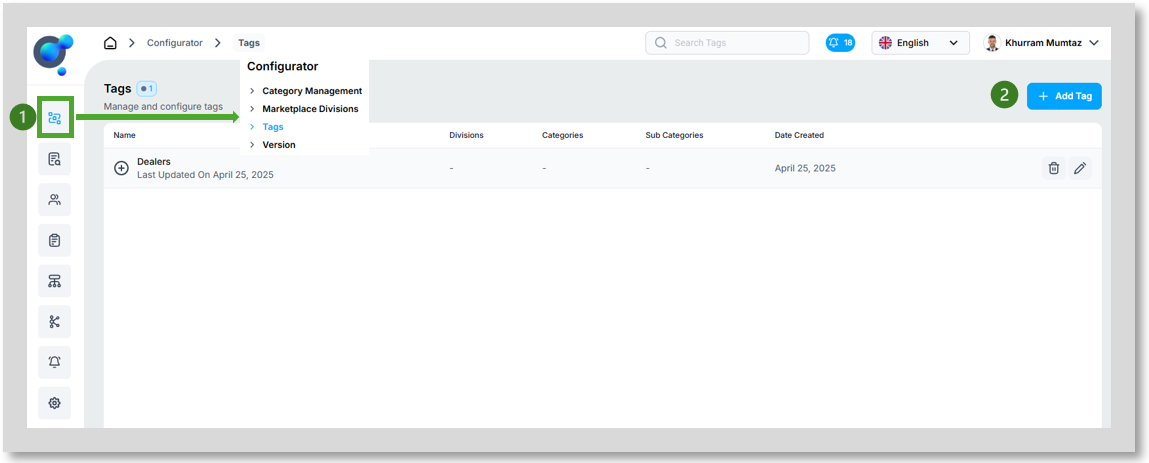
Click on the “Tags” (1) button on the side navigation and then click on “Add Tag” (2).
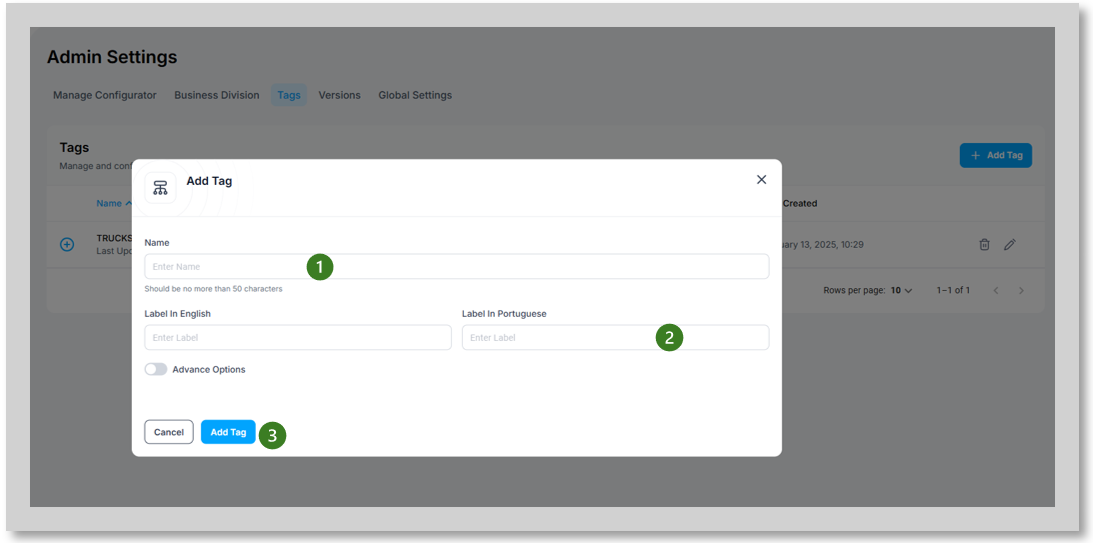
Now, fill out the required fields: “Name” (1) and “Label” for each language (2), then click on “Add Tag” (3) to proceed.
The tags you create will be listed under “Tags” when setting up sub-categories/ equipment types in coreflex.