Creating a New Cluster
Steps to create a cluster:
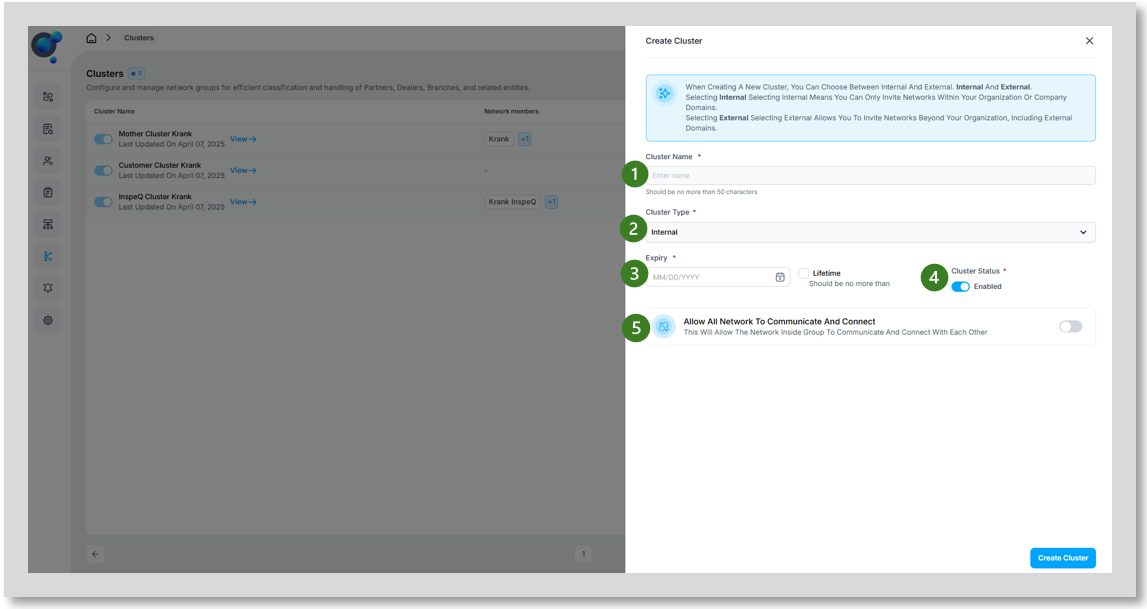
Click on “Create Cluster” on the Cluster Dashboard.
Provide a Cluster Name (1).
Choose internal or external user cluster (2)- this is the expected user types.
Selecting Internal means you can only invite networks within your organization or company domains.
Selecting External allows you to invite networks beyond your organization, including external domains.
Set lifespan (3) (specific end date or lifetime).
Enable/Disable (4) Switch clusters on or off when required without the need to delete.
Allow All Network to communicate and connect (5). This will allow the network inside group to communicate and connect with each other, toggle on/off.